OmniRadar
A downloadable tool for Windows
See where Minecraft sounds and world events happen
Windows x64 · Minecraft Java 26.2 · Fabric · Czech UI · Free beta 0.1.0-beta.2
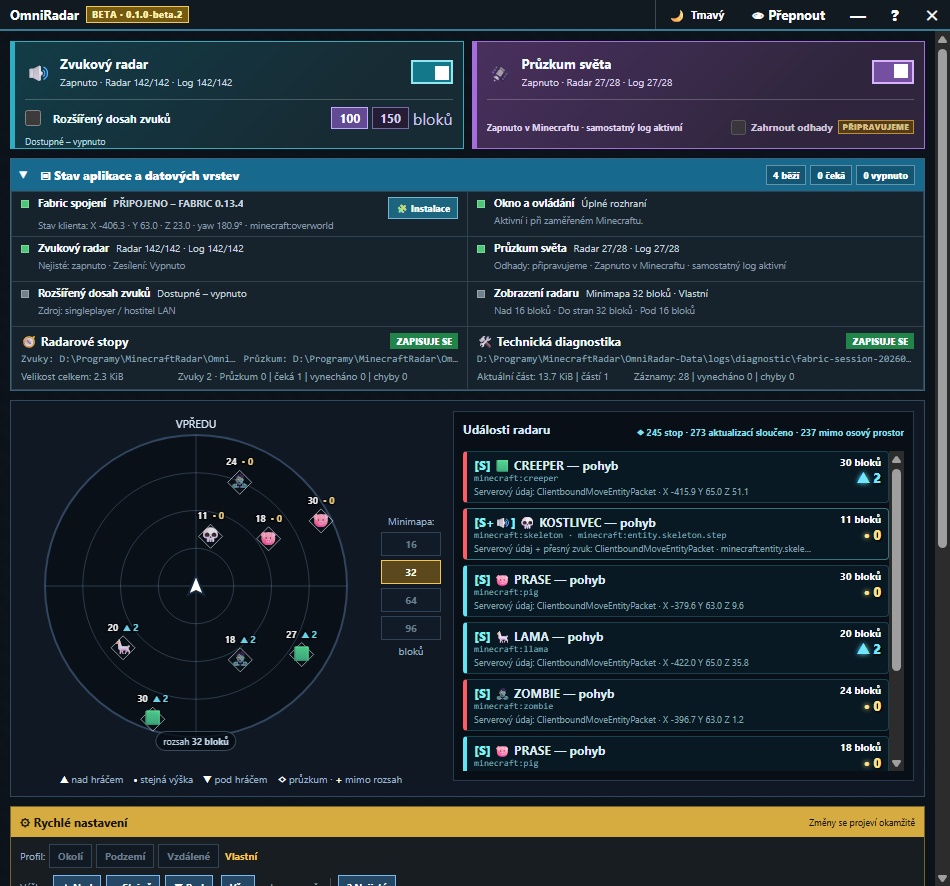
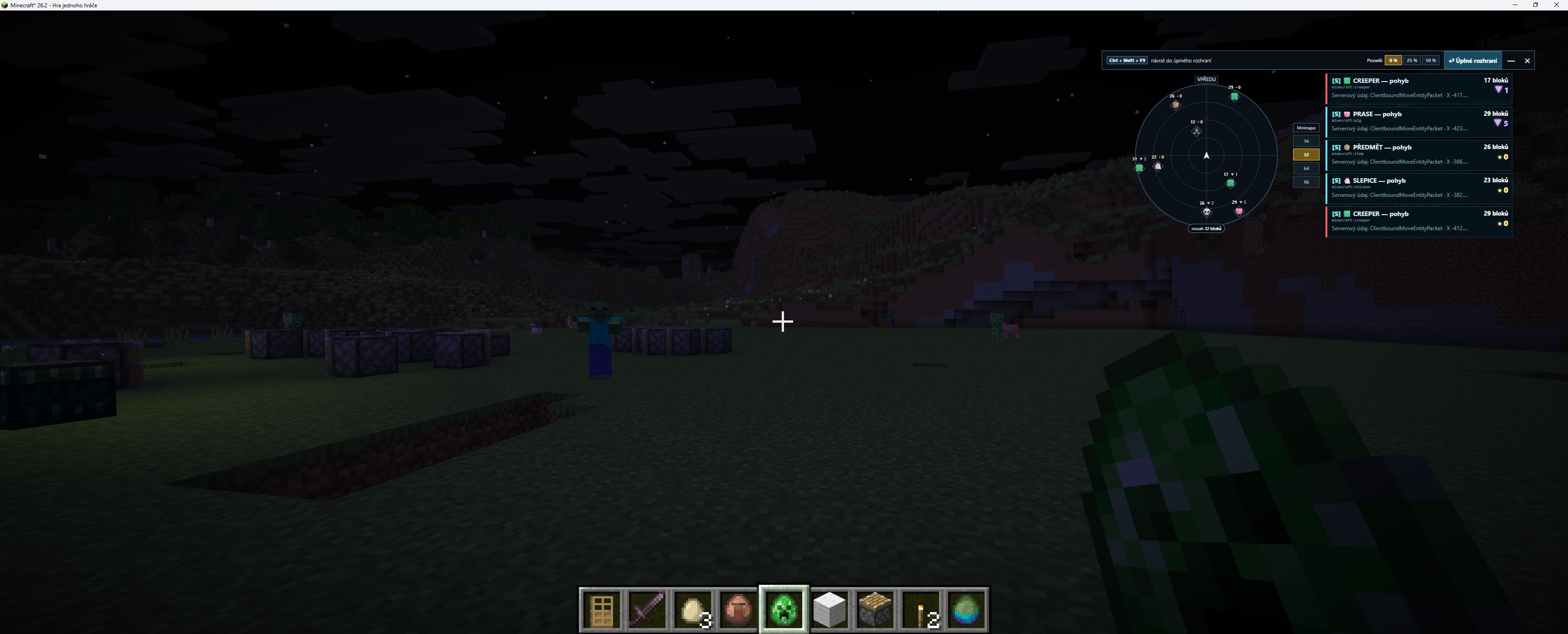
OmniRadar turns received Minecraft sounds and synchronized world events into a directional radar, an event list, and a compact overlay over your game. The interface is currently Czech only; English setup instructions are included below.
The download contains the Windows application and its own OmniRadar bridge mod 0.13.4. Minecraft, Fabric Loader, and Fabric API are not included. You install them separately; the application guides you to the appropriate official downloads.
What you can do
- Locate sounds: see their direction, horizontal distance, and height above or below you.
- Survey nearby events: a separate layer displays supported server-synchronized entities, items, projectiles, vehicles, mechanisms, block changes, and other received events.
- Use a compact overlay: radar and up to five recent events, switched with Ctrl + Shift + F9. Choose 0/25/50% background transparency.
- Focus your view: 16/32/64/96-block minimap scales, above/same-level/below filters, and separate limits for height, horizontal radius, and depth.
- Save your setup: Nearby, Underground, and Distant presets, custom profiles, light/dark themes, and independent display/logging filters.
- Emphasize faint sounds: gently boost already received sounds. Optional 100/150-block extended sound range uses your local integrated server in singleplayer or as the LAN host.
- Get installation guidance: check your Minecraft profile, select another Minecraft folder, and install the bundled OmniRadar mod through a confirmation-based workflow with backups.
Know the limits
Ordinary radar and world survey use data your Minecraft client has received. They can show received events behind terrain, but cannot retrieve events a remote server never sent or discover unloaded areas. The 100/150-block extended-range option applies to sounds only and is unavailable on remote servers. World survey continues to display received server events on remote servers, subject to your filters and spatial limits; it is not restricted to singleplayer or by that sound-range option. Changing minimap scale does not increase the server's transmission range.
[S] marks direct server data; distance and direction are calculated from received coordinates. Repeated sounds are grouped as events, not a guaranteed creature count. Estimates marked PŘIPRAVUJEME are not available yet.
Use in singleplayer or only where multiplayer server rules permit entity and sound radars.
Setup
- Extract the entire ZIP to a writable folder and run OmniRadar-0.1.0-beta.2-x64.exe as a normal user.
- Open Kontrola instalace (Installation check) or Instalace. Choose the correct Minecraft folder.
- Prepare Minecraft Java 26.2, Fabric Loader 0.19.3, and Fabric API 0.154.2+26.2, 0.158.0+26.2, or 0.159.0+26.2. Loader and API are separate components. The game needs a compatible Java 25+ runtime.
- With Minecraft and its launcher closed, use the checker to install the included OmniRadar mod if needed.
- Launch the Fabric profile, enter a world, and wait for Fabric spojení — PŘIPOJENO (Connected). Enable the desired layers and choose Okolí (Nearby).
- Press Ctrl + Shift + F9 to toggle the overlay.
Quick labels: Zvukový radar = Sound radar; Průzkum světa = World survey; Podzemí = Underground; Vzdálené = Distant; Nad / Stejně / Pod = Above / Same level / Below.
The connection stays on the same PC. Settings and logs are saved in OmniRadar-Data beside the EXE. No Node.js, Gradle, or development IDE is needed.
Beta notes
This build is unsigned, so Windows may show SmartScreen. Verify the source and checksum. The author has confirmed beta.2 works on a second PC without administrator rights. Broader LAN, remote-server, and long-duration testing is still incomplete. This release does not support other Minecraft versions, Bedrock, Forge, NeoForge, macOS, or Linux. Automatic updates are not included.
ZIP SHA-256:E3EDD26CAF90FA4A9429C76B7F1B3383DF8385D510E7D8FD2F5644F1DB8E8B01
Česky: radar zvuků a událostí kolem tebe
OmniRadar je bezplatná testovací beta s českým rozhraním. Ukazuje přijaté zvuky a serverové události na minimapě i v overlayi nad hrou — včetně směru, vzdálenosti a rozdílu výšky.
Můžeš odděleně zapínat Zvukový radar a Průzkum světa, filtrovat kategorie, omezovat oblast nad sebou, do stran a pod sebou a ukládat vlastní profily. Připravené jsou režimy Okolí, Podzemí a Vzdálené, světlý/tmavý motiv a samostatné logování.
Jak začít
- Rozbal celý ZIP do zapisovatelné složky a spusť EXE bez správce.
- V Kontrole instalace vyber Minecraft a postupuj podle českého návodu.
- Minecraft Java 26.2, Fabric Loader 0.19.3 a odpovídající Fabric API si instaluješ zvlášť. Otestované API: 0.154.2+26.2 / 0.158.0+26.2 / 0.159.0+26.2. Vlastní propojovací mod OmniRadar 0.13.4 je přibalený.
- Při zavřené hře i launcheru případně potvrď instalaci tohoto modu.
- Spusť Fabric profil, počkej na zelené spojení, vstup do světa a zapni požadované vrstvy. Overlay přepíná Ctrl + Shift + F9.
Radar může zobrazit přijatou událost i za stěnou nebo pod zemí, ale nezíská data, která cizí server neposlal. Rozšířený dosah 100/150 bloků se týká pouze zvuků a funguje s vlastním integrovaným serverem v singleplayeru nebo u hostitele LAN. Průzkum světa zobrazuje přijaté serverové zprávy i na cizích serverech, podle nastavených filtrů a prostorových limitů; uvedená volba zvukového dosahu jej neomezuje. Odhady označené PŘIPRAVUJEME zatím nefungují. Na multiplayeru respektuj pravidla serveru.
Beta není digitálně podepsaná; Windows může zobrazit SmartScreen. Nastavení a logy zůstávají ve složce OmniRadar-Data vedle EXE. Podpora dalších verzí Minecraftu ani automatické aktualizace nejsou součástí tohoto vydání.
About / O projektu
By filipacz. Development and publication text were assisted by generative AI. The promotional cover was generated with AI from an application screenshot. The gallery images are original usage screenshots.
Vývoj a text stránky vznikaly s pomocí generativní AI. Titulní grafika vznikla pomocí AI ze screenshotu aplikace. Galerie obsahuje původní screenshoty ze skutečného používání.
This beta is free to download and use. Application source code is not included. Free access to this version does not promise free future versions or support. Separate component licenses remain applicable, including MIT for the OmniRadar Fabric mod.
Tuto betu lze zdarma stáhnout a používat. Zdrojový kód aplikace není součástí vydání. Bezplatné poskytnutí této verze není příslibem budoucích verzí nebo podpory zdarma. Samostatné licence součástí zůstávají zachované, včetně MIT pro Fabric mod OmniRadar.
Not an official Minecraft product. Not approved by or associated with Mojang or Microsoft.
Nejde o oficiální produkt Minecraftu ani produkt schválený nebo propojený s Mojangem či Microsoftem.
Download
Install instructions
English
- Extract the entire ZIP to a writable folder. Run OmniRadar-0.1.0-beta.2-x64.exe without administrator rights.
- Prepare Minecraft Java 26.2, Fabric Loader 0.19.3, Fabric API 0.154.2+26.2, 0.158.0+26.2 or 0.159.0+26.2, and Java 25+. Minecraft, Loader and API are not bundled.
- Open Kontrola instalace, select your Minecraft folder and follow the guide. With Minecraft and its launcher closed, install the included OmniRadar bridge mod if needed.
- Start the Fabric profile and enter a world. Enable Zvukový radar (sounds) and/or Průzkum světa (world survey). Ctrl + Shift + F9 toggles the overlay.
Interface: Czech. Settings and logs: OmniRadar-Data beside the EXE.
Česky
Rozbal celý ZIP a spusť EXE bez správce. V aplikaci otevři Kontrolu instalace a postupuj podle českého návodu. Minecraft, Fabric Loader a Fabric API se instalují zvlášť. Vlastní propojovací mod OmniRadar je přibalený. Po spuštění Fabric profilu vstup do světa, zapni požadované vrstvy; overlay přepíná Ctrl + Shift + F9.
ZIP SHA-256: E3EDD26CAF90FA4A9429C76B7F1B3383DF8385D510E7D8FD2F5644F1DB8E8B01
Leave a comment
Log in with itch.io to leave a comment.